 Lighten
One sentence in. Your family week, planned.
Parents carry thousands of tiny things in their heads. Tell Lighten one messy sentence and it becomes the tasks, reminders, events and shopping hiding inside it, shared with your partner in real time.


✓ No account or email to start✓ Syncs iPhone ↔ Android✓ No ads, ever
You say
Lighten creates
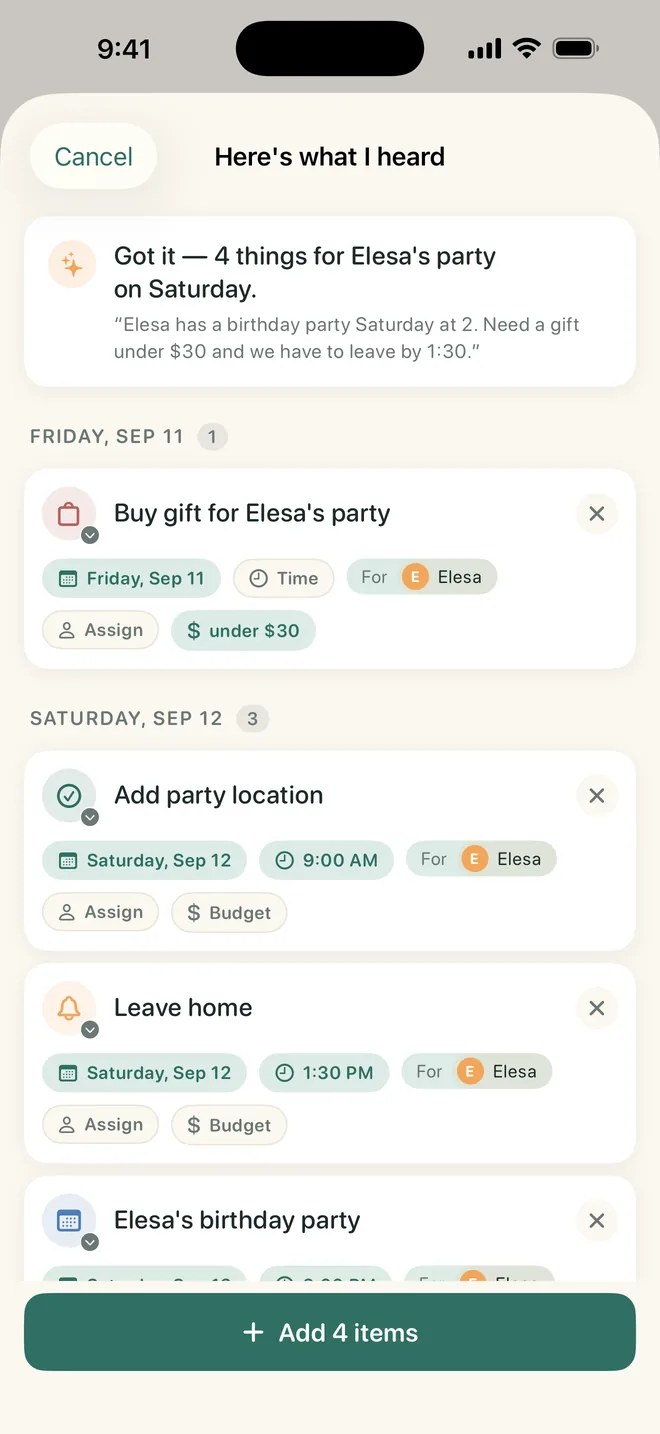
- 🛍️Buy gift for Elesa · under $30Friday
- 📍Add party locationSat morning
- 🔔Leave homeSat 1:30 PM
- 🎈Elesa’s birthday partySat 2:00 PM
Say it once. It’s handled.
Three steps, about twenty seconds, and nothing lives only in your head anymore.
Tell Lighten anything
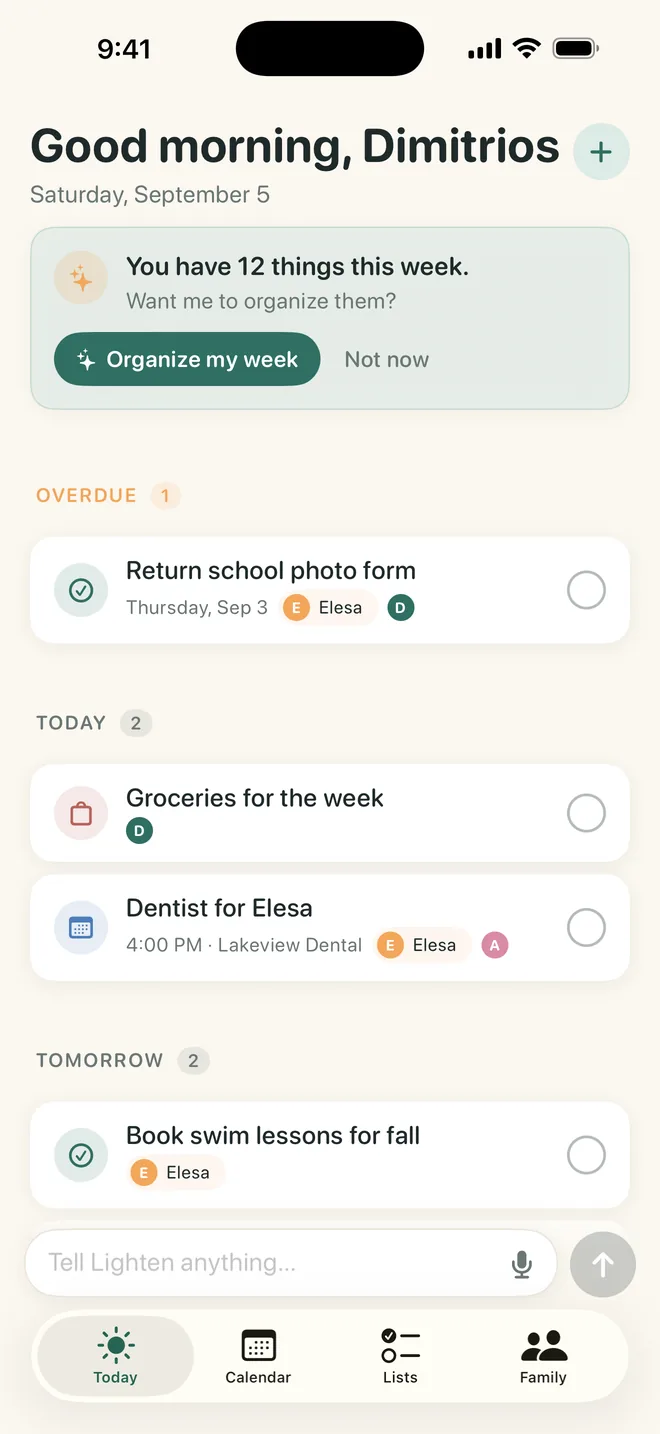
Type into the Tell Lighten anything box at the bottom of the Today tab, or tap the mic and say it: the party, the gift budget, the pickup time, the form due Friday. Messy is fine.
Here’s what I heard
A review sheet lists every event, task, reminder and shopping item Lighten found, with dates, budgets and which kid it is for. Tweak anything, then tap Add.
Shared instantly
Everything lands in the Today and Calendar tabs on your partner’s phone the same second, iPhone or Android. Check it off and it is done for both of you.
Built for real family life, not for project managers
Calendar and to-do apps are tools you have to feed. Lighten is an assistant that understands the chaos.
One sentence becomes a plan
Lighten reads what you told it the way a good friend would. It spots the prep work hidden inside an event, adds the budget, tags the right child and puts each item on the right day.
- Events, tasks, reminders and shopping in one pass
- Budgets like “under $30” are kept with the item
- Tag items to a specific kid
- Tap the mic and dictate while you drive to pickup
Shared with your partner, live
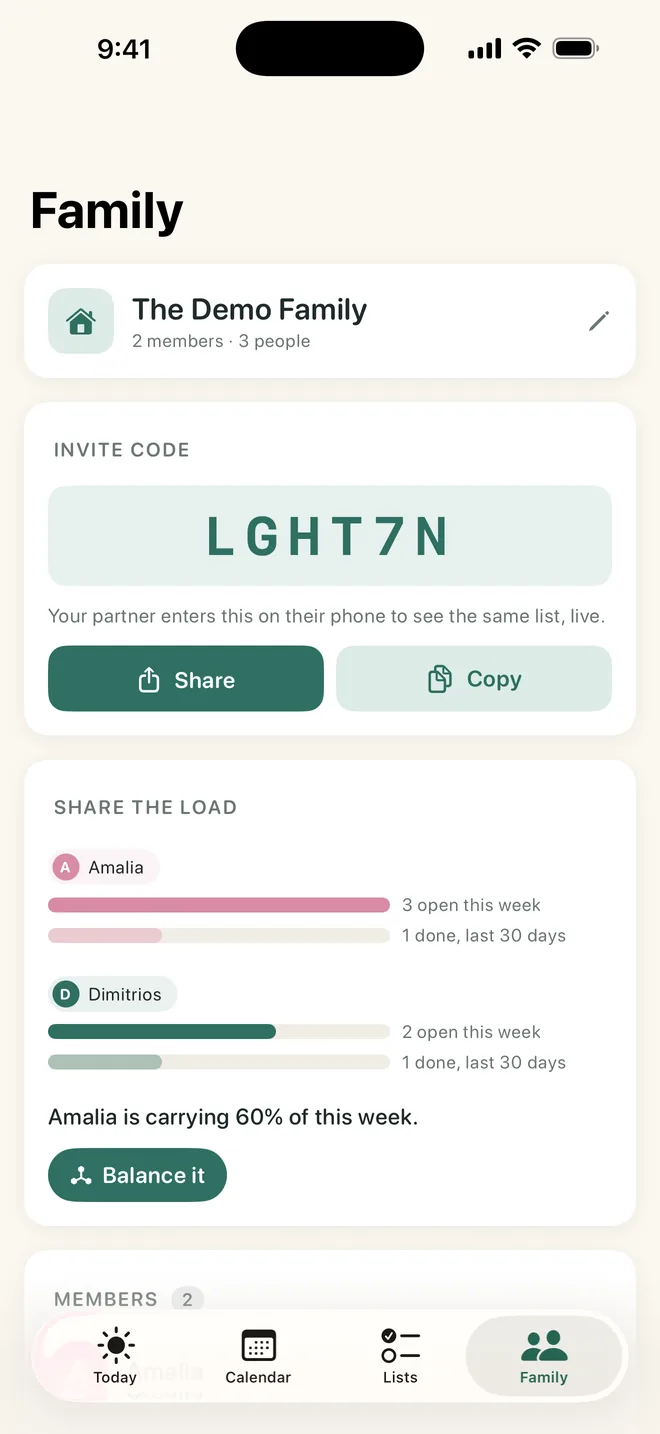
Open the Family tab and share the six-character invite code. Every task, event and list is on both phones instantly. The Share the load card shows who is carrying what this week and last month, and Balance it asks Lighten for a fairer split.
- Works across iPhone and Android
- Share the load bars for each of you
- Assign anything to anyone in a tap
It organizes your week for you
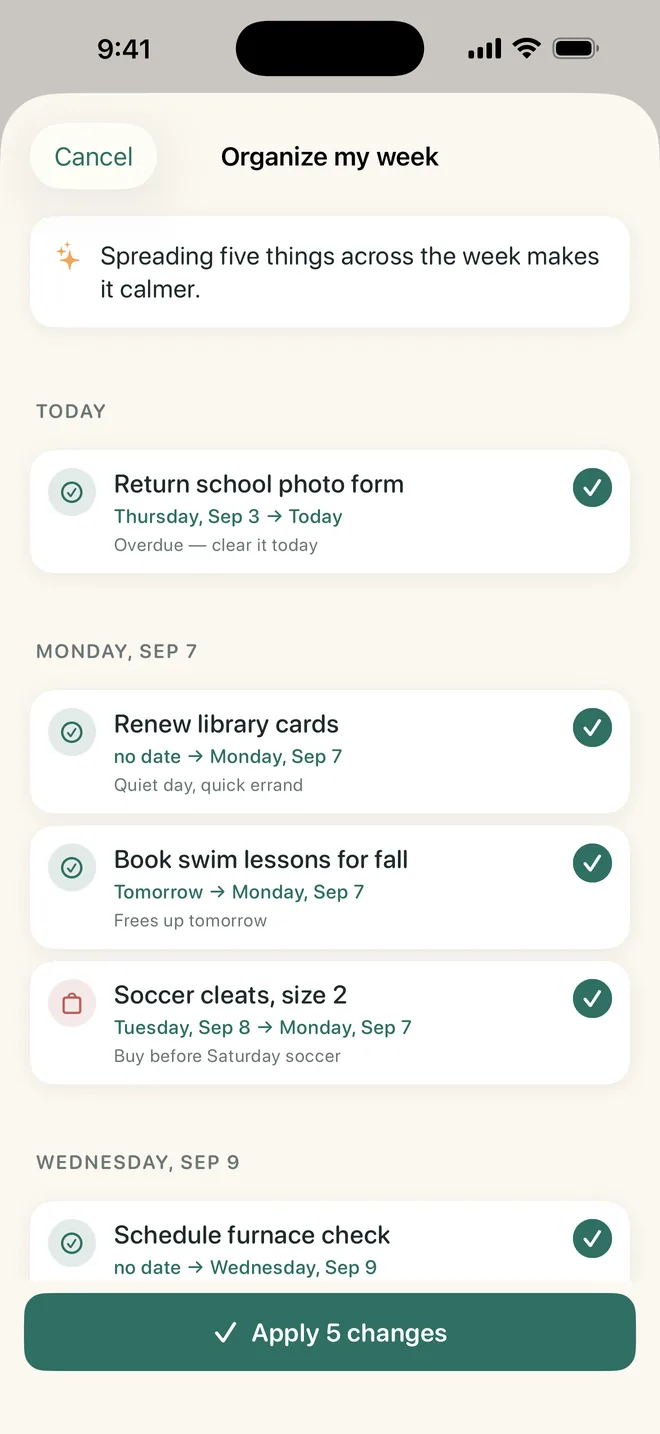
The Today tab asks: “You have 7 things this week. Want me to organize them?” Tap Organize my week and Lighten proposes dates for undated tasks, moves prep before the events it serves, and spreads the load across quieter days. You approve with one tap.
- Clears overdue items first
- Explains every change in plain words
- Nothing moves until you say so
Every family list in one place
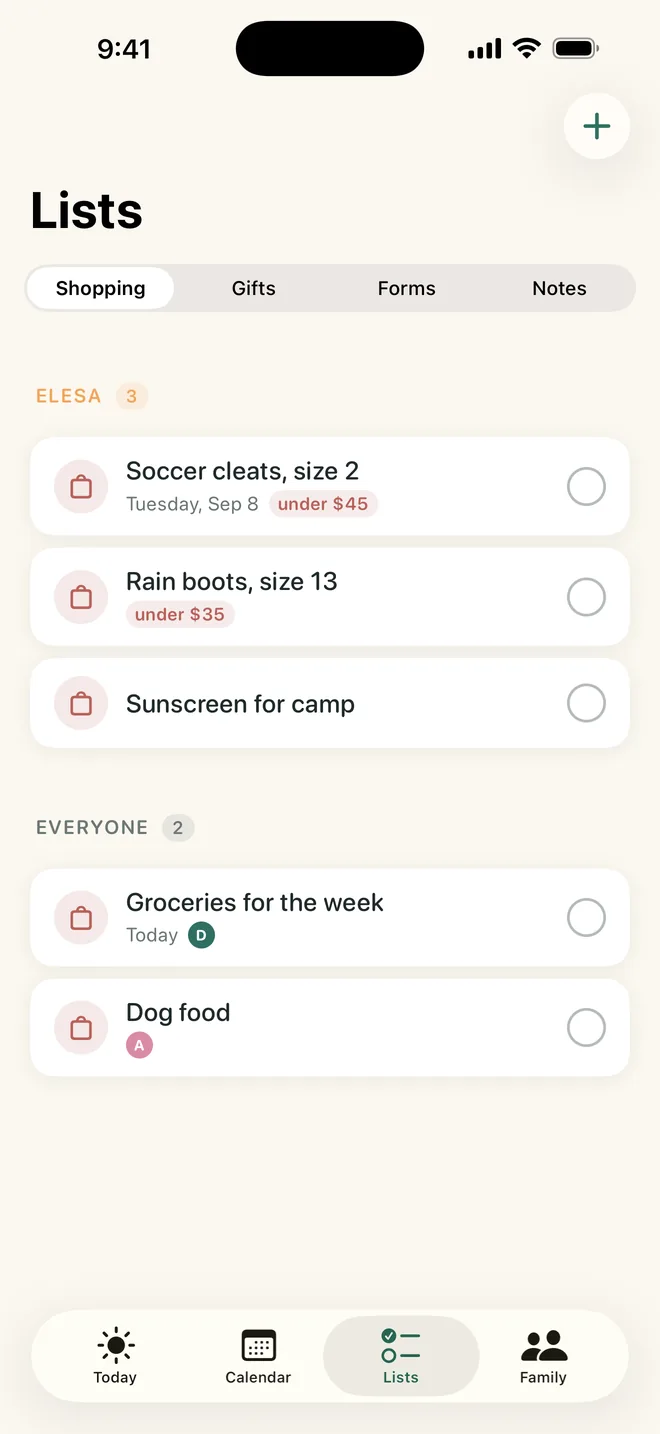
The Lists tab keeps Shopping, Gifts, Forms & Admin and Notes. Grouped by kid or for everyone, with budgets and due dates, shared with your partner so nobody buys the cleats twice.
- Shopping and Gifts lists with budgets
- Forms & Admin with due dates
- The Calendar tab shows the whole family by week, month or year
Reminders that make sense
An hour before events, the morning of tasks, and one calm Morning digest instead of a hundred pings.
Works offline
Add and check off anything without signal. It syncs the moment you are back online.
Private by design
Only the people you invite can see your household. No data selling, no ads, no email required.
Native on both platforms
A real iPhone app and a real Android app, built for each, kept in sync.
For whoever is the family’s brain right now
Parents of school-age kids
Permission slips, spirit days, practice schedules, birthday parties. The season where the load peaks.
Couples who want a fair split
Make the invisible work visible. Share the load shows who carries what, so “I didn’t know” stops being an answer.
New parents
Pediatrician visits, feeding supplies, daycare forms. Say it while it is in your head, at 3 a.m. if needed.
Co-parents and caregivers
One shared household across two homes or with grandparents, on whatever phones they already have.
Not another to-do app
You already have a calendar, a notes app and a group chat. The problem is that you still have to do all the thinking.
| What you need | Shared calendar | To-do app | Family group chat | Lighten |
|---|---|---|---|---|
| Understands one messy sentence | No | No | No | Yes |
| Finds the prep work inside an event | No | No | No | Yes |
| Shared live with your partner | Yes | Sometimes | Yes | Yes |
| Shows who carries the load | No | No | No | Yes |
| Organizes your week for you | No | No | No | Yes |
| Shopping, gifts and forms lists | No | Partly | No | Yes |
| iPhone and Android together | Depends | Depends | Yes | Yes |
Free to start. One subscription for the whole family.
Try everything free. Upgrade when the AI has earned it.
Free
Forever
- Unlimited manual tasks, events and lists
- Share with your partner, live
- Reminders and morning digest
- 5 AI brain dumps or photo scans every 7 days
- iPhone and Android
Lighten Plus
or $39.99/year (save 44%)
- Everything in Free
- Unlimited AI brain dumps and photo scans
- Organize my week
- Balance it, from the Share the load card
- One subscription unlocks the whole household
Cancel any time in your App Store or Google Play settings.
Questions parents ask
What is Lighten?
Lighten is an AI family organizer for parents and couples. You type or say one messy sentence about family life and Lighten turns it into dated tasks, events, reminders and shopping items, shared with your partner in real time on iPhone and Android.
Is Lighten free?
Yes. The free plan includes unlimited manual items, sharing with your partner, lists, reminders and 5 AI brain dumps every 7 days per household. Lighten Plus ($5.99/month or $39.99/year, with a 7-day free trial) adds unlimited AI brain dumps, Organize my week and Balance it. One subscription unlocks the whole household.
Does it work if my partner has an Android phone and I have an iPhone?
Yes. Lighten is native on both iPhone and Android and the household syncs instantly between them. Invite your partner with a six-character code.
Does Lighten work with Google Calendar or Apple Calendar?
Yes, one way. Lighten gives your household a private calendar link that you can add to Apple Calendar or Google Calendar, so everything in Lighten shows up in the calendar you already check and keeps updating. Lighten does not import events from those calendars.
Can Lighten read a school flyer or a sports schedule?
Yes. Tap the camera next to the Tell Lighten anything box and take or choose a photo of a school flyer, sports schedule, party invite or handwritten list. Lighten turns every date in it into tasks and events for you to check before they are added. Photo scans count toward the free plan’s 5 AI uses every 7 days, and Lighten Plus makes them unlimited.
Do I need to create an account?
No. Lighten starts without an email or password. Tap Start my household, share the invite code from the Family tab, and your partner taps I have an invite code. You are both in.
What is the invisible load?
The invisible load is the work of remembering, planning and anticipating everything a household needs: school forms, birthday gifts, appointments, pickups, groceries. It usually falls on one parent. Lighten gets it out of your head and makes it visible and shareable. Read more about sharing the family load.
How is Lighten different from Cozi or a shared calendar?
A calendar stores what you type into it. Lighten understands what you say. One sentence like “Elesa has a party Saturday at 2, need a gift under $30, leave by 1:30” becomes four separate dated items, including the prep work you would otherwise forget. It also organizes your week and shows who is carrying the load. We compare it honestly with Cozi and other options in our Cozi alternatives guide.
Is my family’s data private?
Your household’s data is visible only to the people you invite. Lighten does not sell data and does not show ads. See the privacy policy.
Can I use Lighten by voice?
Yes. Tap the mic next to the Tell Lighten anything box and say it, for example while driving to pickup. Lighten parses it the same way as typed text.
Your family’s brain, lighter.
Download Lighten, say one sentence, and watch it become a plan you can share.